Wednesday, November 25, 2015

ESP8266 IoT Smart Plug with NETPIE


ESP8266 IoT Smart Plug with NETPIE
ESP8266 WiFi Module make smart plug Internet of Things Application.

System Diagram
Hardware
1.ESP8266 WiFi Module ( ESP-12E )
2.Relay Module
3.OLED Display

Wiring Diagram


ESP8266 Pin GPIO_15 to Relay
ESP8266 Pin GPIO_04 to OLED SCL pin
ESP8266 Pin GPIO_05 to OLED SDA pin


ESP8266 Source Code and Web App Source Code ( HTML5 )
https://github.com/anunpanya/tutorialNETPIE-SmartPlug

About ESP8266 Code and Web App Code
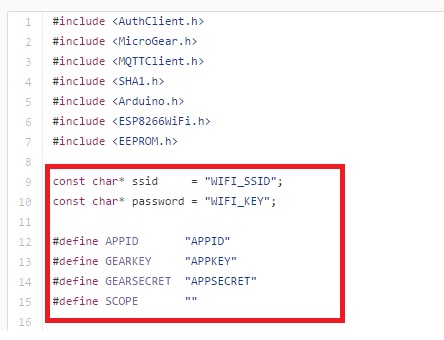
You need register and login to get APPID, APPKEY and APPSECRET.
Then Use them to your code.

ESP8266 Code

Web App Code ( html )


NetPie IoT Service https://netpie.io/


Original Project from NetPie ( in Thai Language )
https://netpie.io/smart-plug/


My Blog


My Website
email : info@softpowergroup.net   Tel .081-6452400

Facebook https://www.facebook.com/softpowergroup/

Friday, November 6, 2015

ESP8266 WiFi Development kit connect TFT LCD Display


ESP8266 WiFi Development kit connect TFT LCD Display


Wiring Diagram

TFT LCD Pin VCC
TFT LCD Pin GND
TFT LCD Pin CS  to GPIO_5
TFT LCD Pin RST to RST
TFT LCD Pin DC to GPIO_2
TFT LCD Pin MOSI to GPIO_13
TFT LCD Pin CLK to GPIO_14
TFT LCD Pin LED to +3.3 V.
TFT LCD Pin MISO ( not use )


Hardware
1.ESP8266 WiFi Module ( ESP8266 DevKit or NodeMCU )
2.TFT LCD 2.2 Inch  : TFT01-2.2SP from Electrofreak (SPI Bus )


Software Test on Arduino IDE


Goto Menu 
Files => Examples => Adafriut ILI9341 => graphictest


If you don't have that examples.
Must Include Library First
Goto Menu
Sketch => Include Library => Manage Library


Input "Adafruit ILI9341" in Filter your Search...
Your will find Adafruit ILI9341 Then Install it.
Now.Your will have Adafruit ILI9341 Examples.


Open Code and edit some pin

Changes 
#define TFT_DC 9  to 2
#define TFT_CS 10 to 5


Test TFT LCD with my ESP8266 Development Board


My Blog


My Website
email : info@softpowergroup.net   Tel .081-6452400

Facebook https://www.facebook.com/softpowergroup/

Friday, October 23, 2015

How to use Arduino IDE with ESP8266 Support


How to use Arduino IDE with ESP8266 Support

When you download and install Arduino IDE already.
( Now is Arduino IDE version 1.6.5 )


Then Open Arduino IDE


1. Go to menu File  ->  Preferences 


and paste to Additional Board Manager URLs Then OK


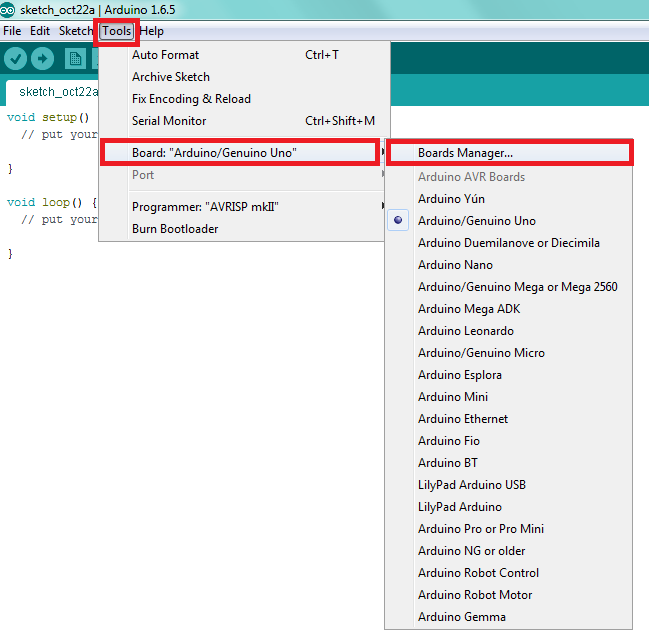
2.Go to Menu Tools -> Board -> Boards Manager...


You will see Boards Manager Windows.
Then type esp8266 in the Filter your search...


Now, It'show esp8266 information Then Click on that and it show INSTALL button.


Installing...


Installed 


 Now, It has ESP8266 Boards in your menu.


My Blog


My Website
email : info@softpowergroup.net   Tel .081-6452400


Sunday, June 14, 2015

Arduino IoT Send Sensor Data to IBM Bluemix


Arduino IoT Send Sensor Data to IBM Bluemix
( IBM Internet of Things Foundation )

IoT Technology has many tools for developers or makers.
IBM Bluemix is a tool for IoT. I've try to use IBM Bluemix and share my project to you.
Project Concept is show in System Diagram Picture.


System Diagram


Hardware
1.Arduino UNO Board ( or Other Arduino Board )
2.Ethernet Shield
3.DHT11 Temperature and Humidity Sensor


Wiring Diagram


DHT11 pin 2 (Data ) to Arduino PIN D8


Arduino Code 

Original code form IBM developWorks

MQTT_IOT_SENSORS.ino
http://www.ibm.com/developerworks/apps/download/index.jsp?contentid=982620&filename=MQTT_IOT_SENSORS.ino&method=http&locale=


DHT11 Library


Arduino MQTT libraries


What is IOT Bluemix and IBM Internet of Things Foundation?

IBM Bluemix is an open-standards, cloud platform for building, running, and managing applications. 
With Bluemix, developers can focus on building excellent user experiences with flexible compute options, choice of DevOps tooling, and a powerful set of IBM and third-party APIs and services.


IBM Internet of Things (IoT) Foundation and the capabilities for IoT development that are part of IBM Bluemix.


How to Send Sensor Data to IoT IBM Bluemix. 


Do you have seen this video yet? 


Edit some Arduino code

Your Mac Address xx xx xx xx xx xx
Your Internet Gateway 123.456.x.xxx
Your IP Address 123.456.x.xxx


Test your Arduino Code
Open Serial Monitor on Arduino IDE
Read temperature and humidity OK.
connect to d:quickstart:arduino:deedbafefeed  OK.


Goto Web IBM Internet of Things Foundation
https://internetofthings.ibmcloud.com/


Quickstart Menu
Then copy your mac address to view your data


Now It's show your Data from Arduino and DHT11 Sensor

This is quickstart for demo.
Your can see the real time temperature and humidity sensor data graph but cannot save to database yet.


My Blog


My Website
email : info@softpowergroup.net   Tel .081-6452400

Sunday, May 24, 2015

Arduino and ESP8266 Control ThingSpeak


Arduino and ESP8266 Control Device with ThingSpeak (IoT)

System Diagram

Hardware
  1. Arduino Board or compatible board
  2. ESP8266 WiFi Module ( ESP-01 ) with Flash New Firmware.
  3. Relay Board
Option 
Regulator Power Supply for Relay Board


Wiring Diagram

ESP8266 pin CH_PD to 3.3 V
ESP8266 pin UTXD to Arduino Pin10  ( RX1 ) 
ESP8266 pin URXD to Arduino Pin11  ( TX1 ) 

Arduino Pin 2 to Relay Channel 1
Arduino Pin 3 to Relay Channel 2


My Development Board


Development Kits on ebay
http://www.ebay.com/sch/marychanyanuch2012/m.html?


Software
1.ESP8266 firmware 
2.Arduino Code
3.ThingSpeak.com

ESP8266 firmware 
You need to upload new firmware to your ESP8266 Module.
Download Firmware from ESPDUINO  https://github.com/tuanpmt/espduino

Firmware is in folder espduino-master/esp8266/release/
It has 2 files .
0x00000.bin
0x40000.bin


Arduino Code 

Original Code from 
Rock solid esp8266 wifi mqtt, restful client for arduino
http://tuanpm.net/rock-solid-esp8266-wifi-mqtt-restful-client-for-arduino/

But,I've modified to control device with ThingSpeak.com

Arduino Code Download V0.2
www.softpowergroup.net/files/Arduino/thingspeak_Control2.zip


Code are need some edit.
Set your SSID Network and Passwoard.


Make your TalkBack Command to control deives.
and make your Channel for show your Data.
Getting Start with ThingSpeak  https://thingspeak.com/docs


ThingSpeak TalkBack API
 To control devices use TalkBack API Command.

GET TalkBack Command

GET https://api.thingspeak.com/talkbacks/2225/commands/XX?api_key=1234567890ABCDEF
xx = COMMAND_ID ( 00 - 99 )


UPDATE TalkBack Command


PUT https://api.thingspeak.com/talkbacks/2225/commands/XX
    api_key=1234567890ABCDEF
    command_string=OPENDOOR
    position=5

More Info https://thingspeak.com/docs/talkback


My Website
email : info@softpowergroup.net   Tel .081-6452400

Sunday, May 17, 2015

Arduino ESP8266 Sent Sensor data to IoT ThingSpeak ( Internet of Things )


Arduino ESP8266 Sent Sensor data to IoT ThingSpeak 
( Internet  of Things )

A major component of or rather the very concept, Internet of Things, is about how to connect various devices to the network so that they can both send data and receive commands. Various technologies to address the last mile connectivity, such as Bluetooth, WiFi, NFC, etc... already exist, but most of these are complicated to deploy and often need additional hardware such as a local control server or appliance.


System Diagram
Hardware
  1. Arduino Board or compatible board
  2. ESP8266 WiFi Module ( ESP-01 ) with Flash New Firmware.
  3. DHT11 Temperature / Humidity Sensor 

Wiring Diagram

ESP8266 pin CH_PD to 3.3 V
ESP8266 pin UTXD to Arduino Pin10  ( RX1 ) 
ESP8266 pin URXD to Arduino Pin11  ( TX1 ) 


ESP8266 Module Pinouts


DHT11 pin 2 (Data ) to Arduino PIN D8


Development Kit Prototype


Development Kits on ebay
http://www.ebay.com/sch/marychanyanuch2012/m.html?


Software
1.ESP8266 firmware 
2.Arduino Code
3.ThingSpeak.com
ESP8266 firmware 
You need to upload new firmware to your ESP8266 Module.
Download Firmware from ESPDUINO  https://github.com/tuanpmt/espduino

Firmware is in folder espduino-master/esp8266/release/
It has 2 files .
0x00000.bin
0x40000.bin


Arduino Code 

Using DHT11 library from: https://github.com/RobTillaart/Arduino

Original Code from 
Rock solid esp8266 wifi mqtt, restful client for arduino
http://tuanpm.net/rock-solid-esp8266-wifi-mqtt-restful-client-for-arduino/

But, I've modified to work with Android UNO Board.


What is Thingspeak?
ThingSpeak is an open source “Internet of Things” application and API to store and retrieve data from things using HTTP over the Internet or via a Local Area Network. With ThingSpeak, you can create sensor logging applications, location tracking applications, and a social network of things with status updates.

Then we use ThingSpeak Channel to store and show your sensor data over Internet HTTP.

Getting Start with ThingSpeak  https://thingspeak.com/docs


View Sensor Data through Thingspeak.com

My Data in my place on 16 May 2015 ( 16:10 - 16:30 )


My On line Real Time Data 
Visit here https://thingspeak.com/channels/36913


Android ThingSpeak Data Monitor App.


ThingSpeak Data Monitor in Android App.
https://play.google.com/store/apps/details?id=iot.sensor.data.monitor


Reference

Rock solid esp8266 wifi mqtt, restful client for arduino

ThingSpeak